
NetGraph
A LibreOffice extension to manipulate graphs (as in graph theory), ordinary as well as directed graphs are supported.
You can take advantage of the drawing capabilities LO offers and then write macros that manipulate the graph. It might also work in OpenOffice.

Features
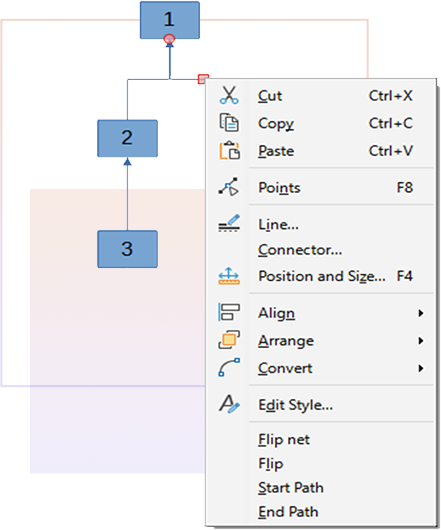
Some new context menu items are introduced in this tool:
Flip: Change the direction of a selected edge. An edge in LO context is a connector.
Flip net: A net is two or more edges connected through common glue points. All these edges will be flipped if just one of the edges are selected.
Start Path: Set the selected node as the start of a path. A node in LO context is a figure which is not a connector.
End Path: If a start has been selected (see above), then by select a node and press “End Path” the path will be shown by painting all vertices in the path red.
Because of a design flaw in LO the above features might only work in an English or danish version of LO.

Code
A programming interface to the extension is available:
module dk { module mikromir { module netgraph{
interface XNetGraph:com::sun::star::task::XJobExecutor {
unsigned short buildGraph([in] string regexnr, [in] string regexname, [in] com::sun::star::drawing::XDrawPage page);
sequence<unsigned short> getGraph();
boolean flip([in] com::sun::star::drawing::XShape shape)
raises (com::sun::star::uno::Exception);
boolean flipNet([in] com::sun::star::drawing::XShape shape)
raises (com::sun::star::uno::Exception);
void setStart([in] com::sun::star::drawing::XShape startShape);
sequence<unsigned short> getPath([in] com::sun::star::drawing::XShape endShape)
raises (com::sun::star::uno::Exception);
com::sun::star::drawing::XShape getVertice([in] unsigned short nr)
raises (com::sun::star::lang::WrappedTargetException, com::sun::star::lang::IndexOutOfBoundsException);
sequence<unsigned short> getEdges([in] short vertice, [in] boolean exit);
sequence<unsigned short> getNetIds([in] short vertice, [in] boolean exit);
void set_eval([in] string evalstr);
void repeat_proc([in] short vertice);
boolean go([in] short max)
raises(com::sun::star::script::provider::ScriptFrameworkErrorException,com::sun::star::reflection::InvocationTargetException);
void stop();
};
}; }; };
With this interface it is possible it is write comprehensive macros which manipulates a graph.
The use is best seen in an example.
Code
A programming interface to the extension is available:
module dk { module mikromir
{ module netgraph {
interface XNetGraph: com::sun::
star::task::XJobExecutor {
unsigned short buildGraph([in] string regexnr, [in]
string regexname, [in] com::sun::star::
drawing::XDrawPage page);
sequence<unsigned short> getGraph();
boolean flip([in] com::sun::star::drawing::XShape shape)
raises (com::sun::star::uno::Exception);
boolean flipNet([in] com::sun::star::
drawing::XShape shape)
raises (com::sun::star::uno::Exception);
void setStart([in] com::sun::star::
drawing::XShape startShape);
sequence<unsigned short> getPath([in] com::
sun::star::drawing::XShape endShape)
raises (com::sun::star::uno::Exception);
com::sun::star::drawing::XShape
getVertice([in] unsigned short nr)
raises (com::sun::star::lang::
WrappedTargetException,
com::sun::star::lang::
IndexOutOfBoundsException);
sequence<unsigned short>
getEdges([in] short vertice, [in] boolean exit);
sequence<unsigned short>
getNetIds([in] short vertice, [in] boolean exit);
void set_eval([in] string evalstr);
void repeat_proc([in] short vertice);
boolean go([in] short max)
raises(com::sun::star::
script::provider::
ScriptFrameworkErrorException,
com::sun::star::reflection::
InvocationTargetException);
void stop();
};}; }; };
With this interface it is possible it is write
comprehensive macros
which manipulates a graph.
The use is best seen in an example.

Example
The “G1” drawing document contains a lot of macros that are used in a search for a 3 color solution for a graph that is not directed. Only the macro “GraphAlgorithm.Main” is supposed to be called by the user.
Prerequisites:
1. Besides the drawing document with the graph, also one spreadsheet document has to be open. The spreadsheet is used to store certain data about each node. See the macro
2. Only one drawing document must be open.
3. LO must be configured with java, and therefore java must have been installed.
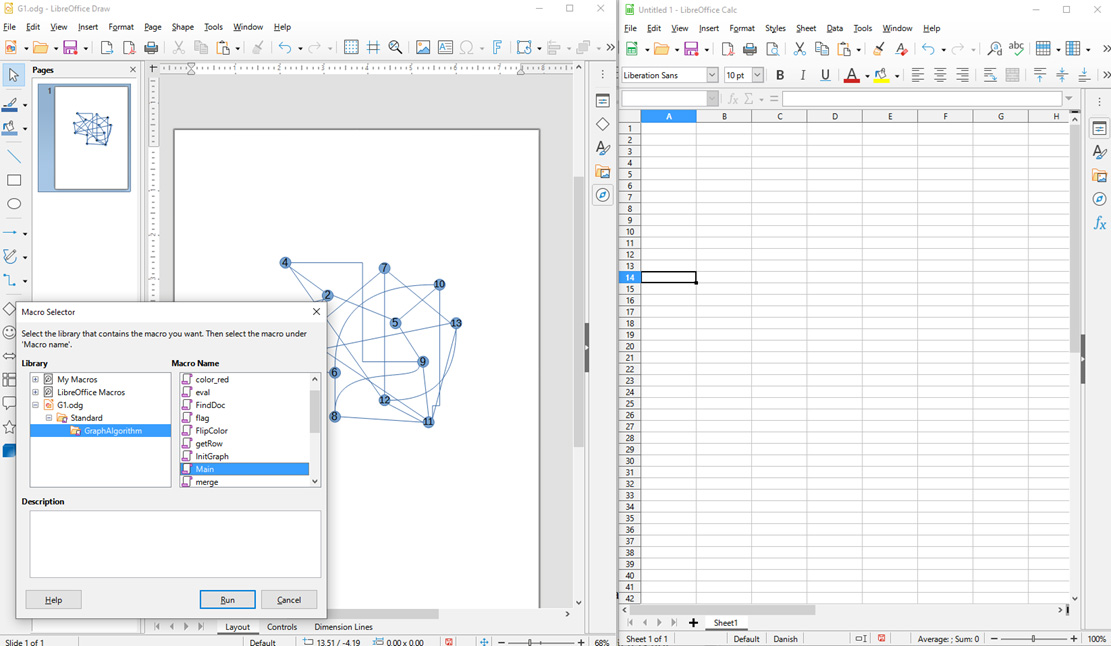
And after running:


Download


NG.zip contains the LO extension. All rights are reserved
THE SOFTWARE IS PROVIDED “AS IS”, WITHOUT WARRANTY OF ANY KIND, EXPRESS OR IMPLIED, INCLUDING BUT NOT LIMITED TO THE WARRANTIES OF MERCHANTABILITY, FITNESS FOR A PARTICULAR PURPOSE AND NONINFRINGEMENT.
IN NO EVENT SHALL THE COPYRIGHT HOLDERS BE LIABLE FOR ANY CLAIM, DAMAGES OR OTHER LIABILITY, WHETHER IN AN ACTION OF CONTRACT, TORT OR OTHERWISE, ARISING FROM, OUT OF OR IN CONNECTION WITH THE SOFTWARE
OR THE USE OR OTHER DEALINGS IN THE SOFTWARE.

Contact
About David Bo Jensen
M.Sc in electronics, living in Copenhagen
I can be contacted through Facebook by leaving a message on:
Facebook link here
I can not guarantee I will answer. It depends on the number of messages and how busy I am.
I am interested in people who know Libre Office well, can write extensions or good C++ programmers.
I work usually with 2 or three people.
Projects about enhancements of my extensions or other graph theory-related projects to which we can contribute or undertake are also interesting. If you share my interests leave a message.
Announcements about tools or updates of these will be done on our Facebook page. Link at the bottom.
